

























How Accounts Payable Automation Works (Agentic AP for Finance Teams)
 Copied!
 How accounts payable automation actually works, step by step, what agentic AP adds, where the human approval gate belongs, and how Round's AP Agent ties payment execution to treasury.
Accounts payable automation captures invoices, codes and matches them, routes approvals and pays suppliers, cutting most manual invoice handling.
TL;DR
- Agentic AP goes further: the software executes the pay run itself, inside limits the finance team sets.
- A human still approves before money moves, and the guide covers where that gate should sit.
- It explains why manual accounts payable is still slow, and walks the automated flow step by step.
- It shows how Round's AP Agent puts this together.
- It compares Round's approach with Xero and Ramp.
Pac O'Shea is Co-Founder and CEO of Round, the UK finance platform that automates treasury, accounts payable, payroll and multi-entity cash management. He works with finance teams who want their cash earning yield right up until the moment it's needed to pay a bill.
What is accounts payable automation?
Accounts payable automation is software that handles the repetitive parts of paying suppliers: reading an invoice, checking it against what was ordered, routing it to the right approver, and paying it on time.
The goal is to remove manual data entry and chasing, not to remove judgement. A finance team sets the rules; the software does the running.
Most finance teams already automate part of this. Xero captures bills through Hubdoc and offers basic approval routing out of the box. What actually separates one AP tool from another is how much of the workflow runs without a person touching it, and where the money to pay the bill comes from in the first place.
That second question matters more than it sounds. Two tools can automate the same six steps and still produce very different outcomes for a finance team, depending on whether the cash funding each payment was sitting idle in an operating account or still working in a treasury balance right up to the moment it left the business.
Why is manual accounts payable still so slow?
Manual AP is slow because every invoice passes through the same chain of hands. Someone opens it, types the numbers into the ledger, checks it against a purchase order, forwards it for sign-off, chases the approver, then schedules the payment separately.
Each handoff adds a day. Each typed field is a chance for a mistake that someone else has to catch later.
Benchmarking research from APQC, drawn from around 1,500 organisations, puts the median cost of processing a single invoice at $5.83, with top-quartile finance teams down at $2.07. Ardent Partners' own research shows a similar gap: firms without mature AP automation average $12.88 per invoice, against $2.78 for the best performers, a reduction of roughly 78%.
The cost isn't only financial though.
The UK government's 2026 response to its late payment consultation, run by the Small Business Commissioner, found that business owners chasing overdue invoices lose an average of 86 hours a year each, a total of 133 million hours across the country. Slow AP is a direct contributor: a bill sits in someone's inbox instead of moving through a clear pipeline, and the supplier on the other end pays for the delay.
New payment-term reforms announced alongside that response push most UK businesses toward stricter 60-day terms and mandatory interest on late payments, which raises the cost of a slow AP process further. A finance team that can't reliably hit a payment date isn't just inefficient, it's exposed.
How does accounts payable automation work, step by step?
Strip away the branding and every AP automation platform, Xero included, runs the same six-stage pipeline. Where they differ is how much of each stage happens without a person, and how tightly the payment step is tied to where the company actually keeps its cash.
1. Capture
An invoice arrives by email, upload, or a forwarding address rather than landing in someone's personal inbox. Optical character recognition and AI extraction pull out the vendor name, amount, due date, invoice number and line items automatically. Well-built capture tools also read attachments sent by WhatsApp or dropped in directly, so the format the supplier chose doesn't slow anything down.
2. Coding
The invoice gets assigned to the right cost centre, account code and project, usually by matching against how similar invoices from the same supplier were coded before.
This is the step that used to eat the most bookkeeper time, and it's also the one AI handles most reliably, because it's pattern matching against history rather than judgement about something new.
3. Matching and anomaly checks
Before anything reaches a human, the system checks the invoice against a purchase order or expected spend, flags duplicate submissions, and looks for anomalies: an amount that's unusually high, a sudden change to a supplier's bank details, or a vendor that's never been paid before.
This is also where fraud gets caught, and it's a step manual AP frequently skips under time pressure.
4. Approval routing
Clean invoices route straight to the approver defined by amount or department, with multi-step sign-off for larger payments. The point of automated routing isn't to remove the approver, it's to stop a routine invoice sitting in a queue behind one that genuinely needs a conversation, and to keep a complete audit trail of who approved what and when.
5. Payment
Once approved, the invoice batches into a scheduled pay run, funded and executed on the due date rather than the moment it was approved. This is the step where the underlying finance architecture matters most: whether the money sits idle in a current account until payment day, or keeps earning yield in a treasury balance right up to the last possible moment.
6. Reconciliation
Paid invoices sync back to the accounting system automatically, marked as paid and matched against the bank transaction, so month-end close doesn't start with an afternoon of manual matching. A genuinely two-way sync also pulls unpaid bills back from the ledger, so nothing gets paid twice or missed entirely.
What does "agentic AP" add on top of standard automation?
Standard AP automation follows fixed rules: if the invoice matches the purchase order, route it here; if it's over a threshold, route it there. Agentic AP adds a layer of judgement on top.
Instead of just flagging that an invoice looks unusual, an AI agent can check why, decide whether it's safe to proceed, and take the next step itself, inside the limits a finance team has already set.
In practice that looks like an agent that codes an invoice, checks it for fraud signals, decides it's clean, and moves it into a pay run without anyone re-keying or re-checking data that's already been verified.
The distinction that matters for a finance team evaluating this isn't the word "agentic" itself, it's how much of the invoice-to-payment chain the agent is actually trusted to run, and what happens at the one step that still needs a person: the moment money leaves the business.
Where should the human approval gate sit in agentic AP?
Full automation without oversight is the wrong goal for anything that moves money. The right question isn't whether a human approves, it's where in the chain that approval sits. Reviewing every field of every invoice defeats the point of automation. Approving the payment run itself, with full visibility into what the agent did to get there, doesn't.
Good agentic AP design puts a human in the loop at the decision that matters, releasing funds, and lets the agent handle everything upstream of it: reading, coding, matching, routing. Exceptions get flagged for a person to look at; everything else moves through a visible, audited pipeline a controller can review after the fact rather than police in real time.
This is close to a regulatory necessity in the UK, not just good practice. Payment execution sits behind money movement rules that require a controlled, auditable release step, which is exactly why every credible agentic AP product, Round included, keeps a human approval gate ahead of the payment itself rather than automating it away.
How does Round's AP Agent put this together?
Round's AP module runs on the same screen as its invoices: connect Xero, forward a bill by email, or upload it manually, and the AI reads the data, codes the expense, and flags duplicates or anomalies before it reaches anyone's queue. Approved bills route by amount or department, with multi-step approval for larger payments and a full audit trail behind every decision.
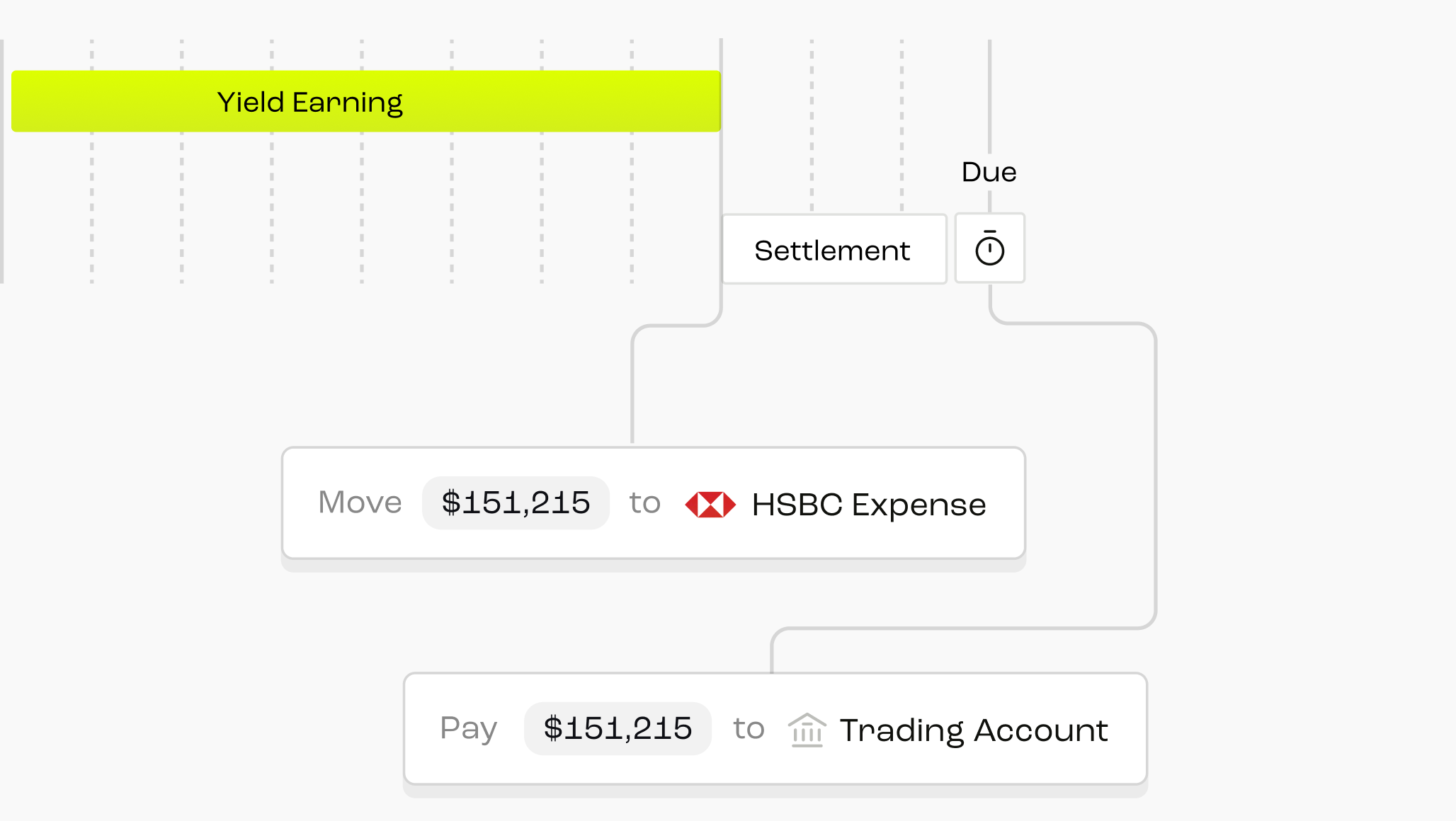
On Round's Accounts Payable solution, once a bill is approved the AP Agent takes over: it pulls funds from the treasury balance, executes the payment on the due date, and settles it, from a single click. Auto-funded bills are a Growth and Enterprise feature; Round's free Launch plan covers capture and manual payment without the agent step.
What makes this different from bolting AI onto a standalone bill-pay tool is that Round funds the payment from treasury, not from a separate operating account sitting idle. Its treasury-to-supplier payments workflow keeps cash earning yield until the precise moment a payment executes, so a finance team isn't choosing between automation and getting the most out of its cash.
Round doesn't issue its own corporate card. For expense cards, it integrates with Pleo rather than competing with it. Its AP capability is the invoice-to-payment workflow itself, tied to treasury, with paid invoices syncing two-way to Xero or NetSuite so nothing has to be re-entered or reconciled by hand.
How does Round's approach compare with Xero and Ramp?
There's no universal best answer here. The right tool depends on what a finance team already runs on and how much of the payment chain it wants automated end to end. The table below is a feature-level comparison, not a ranking.
Xero's built-in AP, via Hubdoc, is genuinely useful for capture and basic approval routing, and it's included with every subscription, but deeper OCR, fraud checks and complex approval chains generally mean adding a third-party tool on top. It's the easiest starting point for a team that isn't ready to change its core ledger.
Ramp's Agents for AP push automation further than most bill-pay tools, particularly for card-funded spend, and Ramp reports touchless processing that's markedly faster than legacy AP software. It's built primarily around a US card and spend model, which is a different funding architecture to a treasury-first approach.
Round's AP Agent is narrower in scope and UK-only, and its real differentiator is funding: bills are paid from a treasury balance that's earning yield right up to the payment date, rather than from cash that's been sitting idle since the invoice arrived.
How should a finance team choose accounts payable automation?
A few honest questions cut through most of the marketing:
- Does it capture invoices the way suppliers actually send them, not just the format the vendor assumed?
- How much of coding, matching and fraud checking happens before a person sees the invoice?
- Where does the payment money come from, and is it earning anything while it waits?
- Does the approval step sit at the payment, with full visibility, or does it force a review of every field?
- Does it sync two-way with the accounting system already in use, so nothing gets re-entered?
- Is the provider regulated for the money movement it's carrying out, and can that be checked independently on the Financial Services Register?
None of this needs to be complicated. The finance teams getting the most out of accounts payable automation in 2026 are the ones that picked a tool matching how their cash actually moves, not the one with the longest feature list. Capture, coding, approval and payment should feel like one pipeline, not four separate tools stitched together.
Related reading
Frequently Asked Questions
Invoice approval and payment runs are automated by combining three things: rules-based routing that sends each invoice to the right approver by amount or department, AI that checks the invoice for anomalies before it reaches that approver, and a scheduled pay run that executes automatically once approval is granted. Round's AP Agent, for example, routes bills for approval and then funds and executes the payment on the due date from a single click, without a separate manual payment step.
AI mainly cuts time at capture and coding, the two steps that used to require manual data entry. Benchmarking from APQC and Ardent Partners shows automated AP teams processing invoices for a fraction of the cost of manual teams (APQC's top quartile spends $2.07 per invoice against a $5.83 median), largely because OCR and pattern matching remove re-keying and reduce the errors that cause rework.
No, not in any credible implementation. Agentic AP automates the steps upstream of payment (reading, coding, matching, routing) and can execute a payment run once approval is granted, but a human approval gate sits ahead of money actually moving. Round, Ramp and other agentic AP tools all keep this gate; the automation is in how little manual work is needed to reach that approval, not in removing it.
The better tools do. A one-way sync only pushes paid invoices into Xero, which means anything entered or edited directly in Xero can drift out of step with the AP tool. A two-way sync also pulls unpaid bills back from Xero, so an invoice added directly to the ledger still shows up in the AP workflow rather than getting paid twice or missed.
Four things matter most: how well it captures invoices in the format suppliers actually send, how much of coding and fraud checking happens before a human sees the bill, where the payment funds come from and whether they're earning anything while they wait, and whether the provider is FCA-regulated for the money movement involved. The right answer depends on the tools already in use and how much of the payment chain a team wants automated end to end.


